
-
Self-Service Analytics registers a connector, that is a connector server from which it requests data. Registering a connector server involves the following REST endpoints:
/api/connector-server/- Use this endpoint to manage the Self-Service Analytics object that provides HTTP connectivity information about the connector server/api/connectors/- Use this endpoint to list functioning connector servers to validate that Self-Service Analytics has registered the connector server/api/connection-type/- Use this endpoint to manage the object that holds the data store parameters and connection parameters that the connector server needs to connect to a data store. This information commonly includes minimum and maximum supported version and connection parameters such as authentication information. A connection-type corresponds to an icon in the administrator’s Sources page and makes it possible for end users to provide login credentials and make a data source from a data store.
-
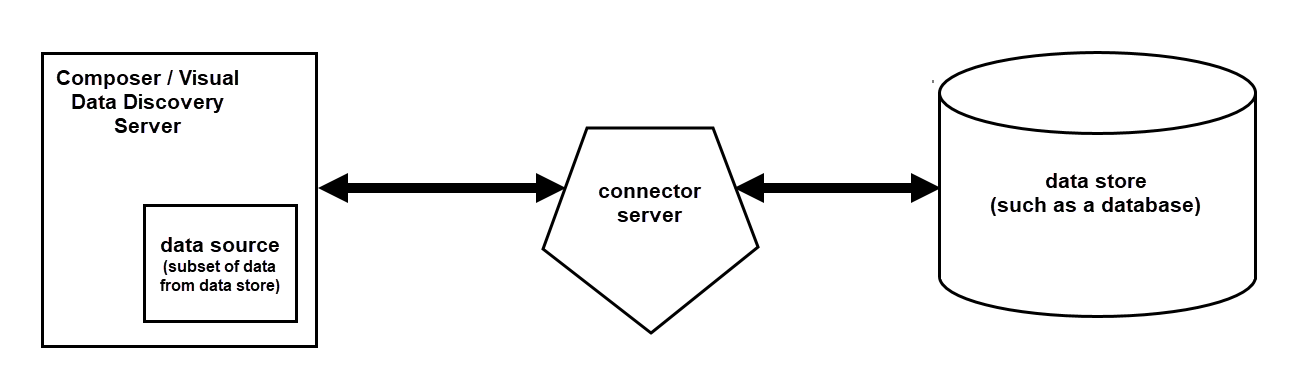
The connector server connects to a data store such as a database, or file upload to create a subset of data called a data source. That data source serves as a source of data for end users to use with visuals. Connecting to a data store involves the following REST endpoints:
/api/connections/- Use this endpoint to provide required parameters, often login credentials, that a connector server uses to access a data store following parameters set by the connection-type./api/sources/{id}- Use this endpoint to create a data source using a connection to a data store. End users can see the date in this data source using visuals.
Registering Self-Service Analytics with a Connector Server
Before Self-Service Analytics can use a connector server, it must register the connector server. Unless connector microservice discovery is turned off, Self-Service Analytics automatically discovers preinstalled connector servers when Self-Service Analytics is started up. Self-Service Analytics does not automatically discover custom-built connector servers. You can use the Self-Service Analytics client application to manually register a connector server, or you can do so using REST APIs. For more information about using the Self-Service Analytics client application to register a connector server, see Configuring a New Connector Manually.Using REST APIs to Register a Self-Service Analytics Connector Server
Before Self-Service Analytics can access a connector server, the connector server must be registered with Self-Service Analytics. If automatic discovery does not work, then you must do this process manually using either the client application or using APIs. Registering a connector server requires providing the information needed to connect with and understand the connector server. Use the following steps to register a connector server using the provided APIs. API documentation is provided in your environment at this link:https://<Self-Service Analytics-URL>/composer/swagger-ui.html.
To register a connector server with Self-Service Analytics:
-
Provide the server with the information that it needs to connect to the connector server using the POST method with the
/api/connector-servers/endpoint. Of the body parameters listed in the reference documentation, the following are required:in which:nameshould be unique and easily remembered.protocolshould be set asHTTP. It is set as DISCOVERY or CORE if the connector was automatically discovered or built into Self-Service Analytics. If you do manual API-based registering, use HTTP.HTTP_URLshould be set to the URL used to access the connector server.
-
After connector server discovery has detected and registered a connector server, or after you have manually registered the connector server using the
/api/connector-servers/endpoint, Self-Service Analytics can validate that the connector server is registered by using the/api/connectors/endpoint. The API returns a dynamically generated list of all registered connectors. -
Provide additional connection parameters using the POST method with the
/api/connection-types/endpoint.in which:-
nameis a string by which the connection type is to be identified by the end user on the Sources page. There may be more than one connection type (configuration) for how each connector is used. End users see each of these as a distinct type of connector, so the best practice is to name it as if it were a distinction connector. For example, you might make two different connection types to access a MySQL database using your MySQL connector server. One connection type might be low-security, using generic credentials for all users. The other connection type might require a user to provide specific, personal credentials that the connector server then passes along to the MySQL database to access specific data available only to that person. The two connection types, show up as two distinct connectors when a user creates a source, name, for example, “All-company MySQL Connector” and “Employee-specific MySQL Connector”. -
storageTypecorresponds to thestorageTypereturned by a connector server when it is asked to describe the database to which is connects. The storage types available via a particular connector server can be found by making a GET call to/api/connector-servers/{connector-server-id}/connection-types.
-
-
Optionally, provide a custom icon to denote the new connection type using the
/api/connection-types/{id}/icon/endpoint. The endpoint expects oneformDataparameter - the icon image. It should be a 72 x 72 image in the form of either an SVG string or a PNG file in base 64 format.
Connecting to a Data Store
After the connector server is registered with Self-Service Analytics and one or more connection types have been defined, you can use the connector server to connect to a data store and create a data source.-
Create a connection via the connector server to a data store by using the POST method with the
/api/{accountId}/connections/endpoint. The response object includes the ID of the created connection attheResponseObject.links[0].href. This value is a string representation of a URL, the last component of which is the id of the object itself. For instance, inhttps://<Self-Service Analytics-URL>/composer/api/connections/58176703e4b06f699c7c70cathe ID of the object is58176703e4b06f699c7c70ca. You can also modify an existing connection by using PUT with the/api/connections/{id}/endpoint. The parameters required by these endpoint are conditioned by the configuration provided by/api/connection-type/.in which:-
nameis the name of the connection. -
connectorNameis the name of the connector used to make the connection. -
connectorParametersis an object of connector parameters as key-value pairs. For example:Connector parameters are different for each connector. Connector servers present these requirements when they are discovered by Self-Service Analytics. TheconnectorParameterscan be identified by calling/api/connection-typesand finding theparametersobject for the appropriatestorageType.Self-Service Analytics periodically introduces or deprecates connector servers. For information about the current status of a particular connector server, see Manage Connectors and Connector Servers. -
sourceParametersandimpersonationParametersmay also be required for a particular connection. This information can be found using the approach used to discoverconnectorParameters.
-
-
Create a data source, that is, a subset of data from a data store, by using POST with the endpoint
/api/connections/{connectionId}/sources/. Required parameters for the source are listed below.in which:nameis the name of the new data source (subset of data from a data store)sourceParametersis an object containing the parameters required to create a source on its particular kind of connection, connector, and data store.
sourceParametersobject are defined by thesourceParametersarray included in theconnectorsobject returned by making a GET call to/api/connectors. In the sourceParameters array, each object defines a key-value pair for thesourceParametersobject required to create a source. For example, thesourceParametersdefinition in this array defines asourceParametersobject that requires anindex, amapping, and apatternType:That definition would be satisfied by thesourceParametersobject below, which could be used to create a source using the/api/connections/{connectionId}/sourcesAPI.