> ## Documentation Index
> Fetch the complete documentation index at: https://insightsoftware.mintlify.site/llms.txt
> Use this file to discover all available pages before exploring further.

# Dashboard Layouts

> Describes how to use the grid layout a dashboard.

Self-Service Analytics's dashboard canvas uses an underlying grid layout, populated by information you add in widgets: visuals, rich text snippets, and filter snippets. You can:

* Move, rearrange, and resize widgets. See [Move, Swap, and Resize Visuals and Widgets in a Dashboard](#move-swap-and-resize-visuals-and-widgets-in-a-dashboard).
* Lock widgets in place by rows or columns to support your preferred layout. See [Lock and Unlock Widget Positions](#lock-and-unlock-widget-positions).
* Serve your dashboard information on a variety of screen sizes, making use of responsive dashboard behavior to support mobile devices. See [Use the Responsive Dashboard Layout](#use-the-responsive-dashboard-layout).

New dashboards you create after upgrading to this version of Self-Service Analytics use the grid layout by default.

<h2 id="convert-dashboards">
  Convert Dashboards
</h2>

When you upgrade your environment, or import a dashboard from an earlier release, you must convert the dashboard to use the grid layout, widget locking, and responsive dashboard features. Converted dashboard widgets are presented in the responsive layout format in the same row and columnar layouts as in their previous configuration.

**Convert a dashboard layout:**

1. Open an imported dashboard or an existing dashboard after upgrading. Self-Service Analytics prompts you to convert the dashboards to responsive format.

2. Select the **Convert Now** option to convert the dashboard to responsive layout.

   Alternatively, select **X** to temporarily hide the conversion banner.

3. Save the dashboard to save the converted dashboard.

   Alternatively, use the save as option to save the converted dashboard using a new name. The original dashboard remains unconverted and unchanged.

<Note>
  Once converted, you can move, swap, and resize widgets more easily, [lock and unlock](#lock-and-unlock-widget-positions) widgets, and enable or disable the responsive layout as needed.
</Note>

You can additionally convert the dashboard using the experimental API `api/dashboards/convert-layout/`.

API documentation is provided in your environment at this link: `https://<Self-Service Analytics-URL>/composer/swagger-ui.html`.

### Show or Hide the Conversion Option

Use the property `suppressAutoLayoutWarning` to control visibility of the conversion banner. By default, this is set to `false`, making the banner visible. In embedded environments, set to `true` to hide the banner.

If the banner is hidden, select the dashboard layout icon to make the banner and conversion option visible again.

<h2 id="use-the-responsive-dashboard-layout">
  Use the Responsive Dashboard Layout
</h2>

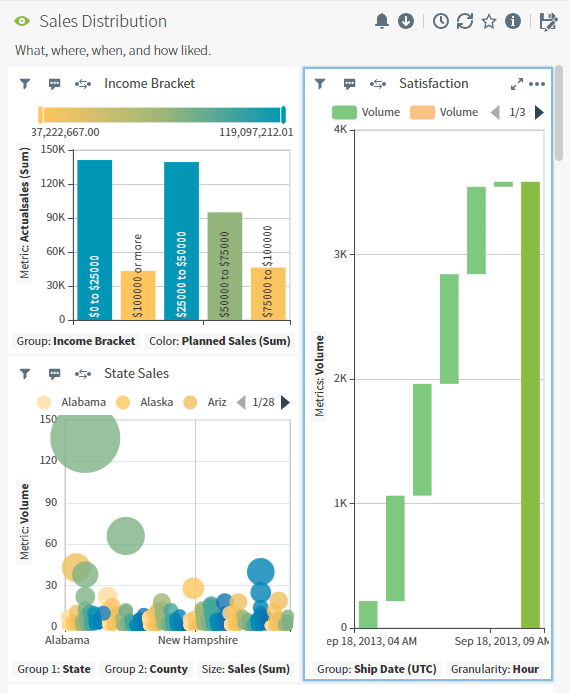
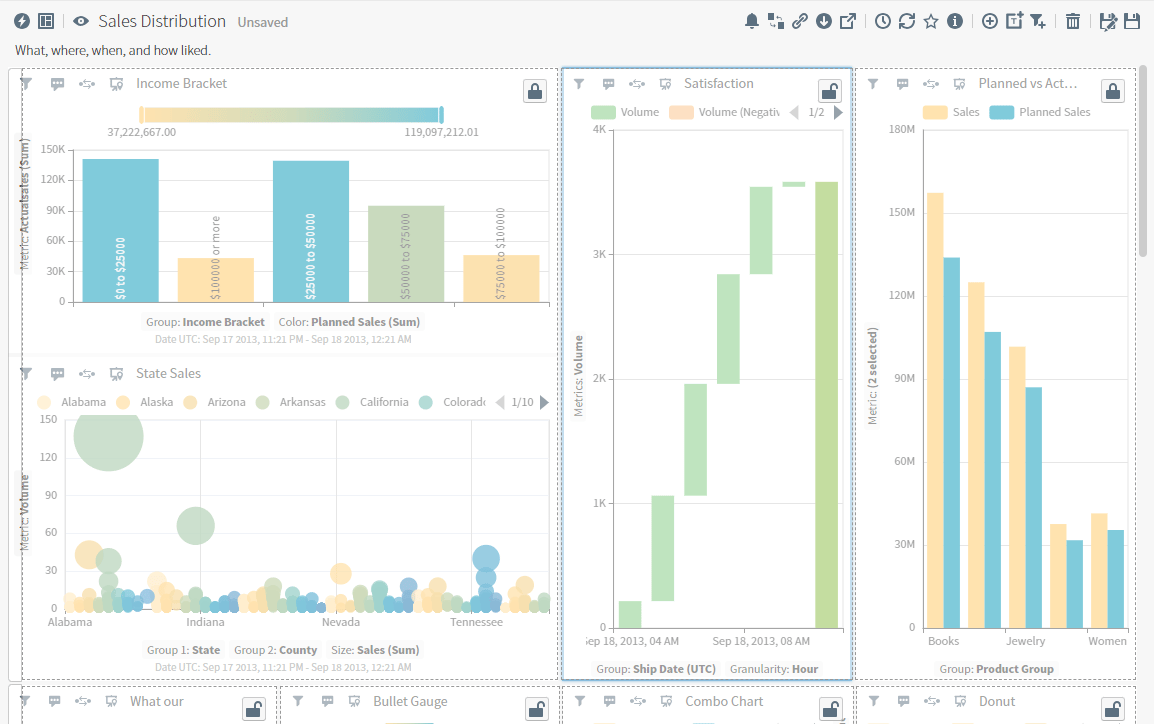
Self-Service Analytics's dashboard layout is responsive, building on a grid format that presents your dashboards to Users with Viewer access a flexible, mobile-friendly layout on a variety of screen sizes. Self-Service Analytics rebuilds the dashboard layout on smaller screen sizes for any widget wider than 250 pixels. Preview the dashboard in [View mode](#use-dashboard-view-mode).

**Edit mode:**
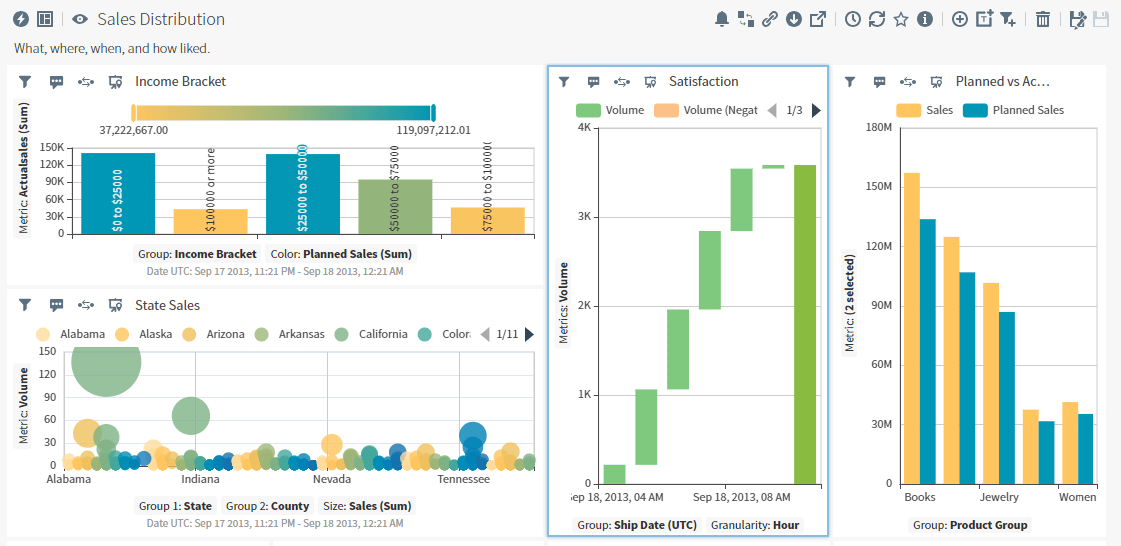
<img src="https://mintcdn.com/insightsoftware/2cXq_sDOxrDVXUcv/simba-embedded-analytics/docs/self-service-analytics/26.3/images/dashboards/dash-responsive-edit-23-2.png?fit=max&auto=format&n=2cXq_sDOxrDVXUcv&q=85&s=0039bc9b2b9662d6760e5243715ff091" alt="make changes to your dashboard in edit mode" width="1121" height="546" data-path="simba-embedded-analytics/docs/self-service-analytics/26.3/images/dashboards/dash-responsive-edit-23-2.png" />

**View mode:**

<img src="https://mintcdn.com/insightsoftware/2cXq_sDOxrDVXUcv/simba-embedded-analytics/docs/self-service-analytics/26.3/images/dashboards/dash-responsive-view-23-2.png?fit=max&auto=format&n=2cXq_sDOxrDVXUcv&q=85&s=cf4902b6e4a96e2eb1f094cb16f01cca" alt="view your responsive dashboard layout" width="570" height="693" data-path="simba-embedded-analytics/docs/self-service-analytics/26.3/images/dashboards/dash-responsive-view-23-2.png" />

When you add widgets in [Edit mode](#use-dashboard-view-mode), Self-Service Analytics groups the widgets in rows and columns. These rows include up to four widgets side by side in a single row. When you add a fifth widget to a dashboard that includes four widgets in a row, Self-Service Analytics starts a new row with the new widget.

If you move, resize, or reposition widgets, then add a new one, Self-Service Analytics will add any new widgets to the first row that contains fewer than three widgets.

### Manage Your Dashboard Layout

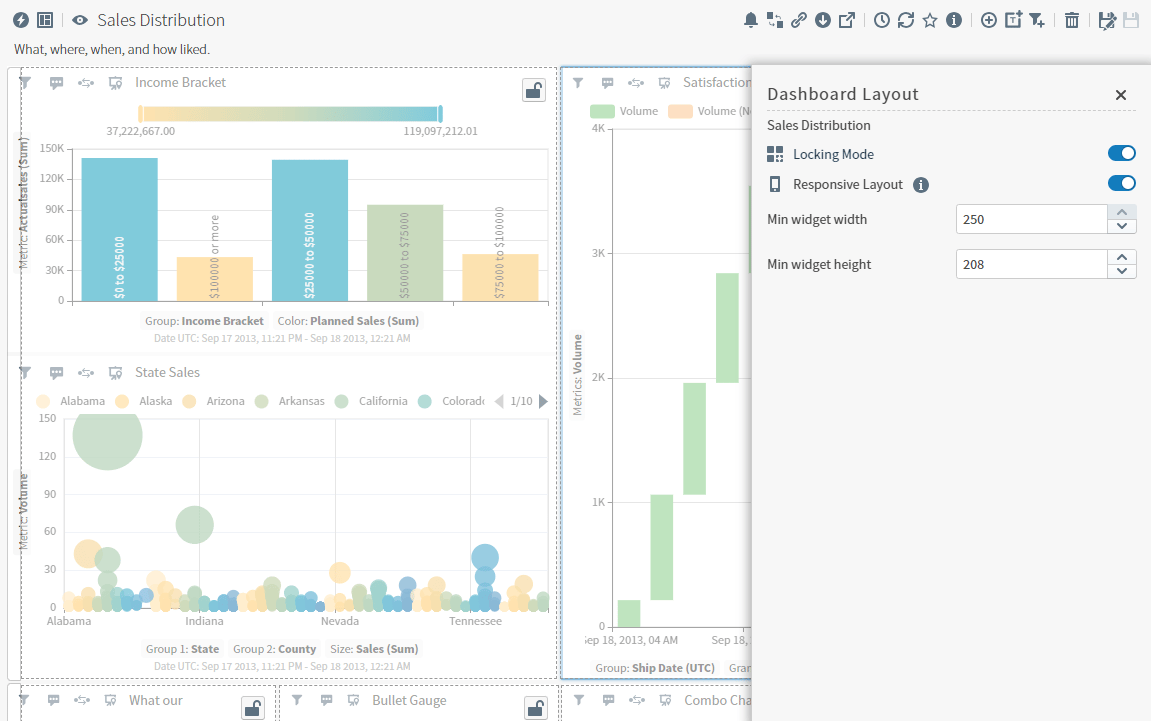
Select the Dashboard Layout icon (<img src="https://mintcdn.com/insightsoftware/sLccJ1EJ28cO5lT_/simba-embedded-analytics/docs/self-service-analytics/26.3/images/icons/dash-layout.png?fit=max&auto=format&n=sLccJ1EJ28cO5lT_&q=85&s=8ed911ffa50986e01a93f56edaffd320" alt="select to open the dashboard layout work area" width="25" height="25" noZoom data-path="simba-embedded-analytics/docs/self-service-analytics/26.3/images/icons/dash-layout.png" />) to open the Dashboard Layout work area. Here you can enable and disable locking mode, the responsive layout, and manage the minimum widget widths and heights.

| Dashboard Layout Option | Description / Actions                                                                                                                                                                                                                                                                                                                                                                                                                                                                                                                                                                                                                                                                                                                                                                                                                                                                                                                                                                                                                                                                                                                                                                                                                                                                                                                                                                                                                                                                                                                                                                                                                                                                                                                                                                                                                                                                                                                                                                                                                                                                                                                                                                                                 |
| ----------------------- | --------------------------------------------------------------------------------------------------------------------------------------------------------------------------------------------------------------------------------------------------------------------------------------------------------------------------------------------------------------------------------------------------------------------------------------------------------------------------------------------------------------------------------------------------------------------------------------------------------------------------------------------------------------------------------------------------------------------------------------------------------------------------------------------------------------------------------------------------------------------------------------------------------------------------------------------------------------------------------------------------------------------------------------------------------------------------------------------------------------------------------------------------------------------------------------------------------------------------------------------------------------------------------------------------------------------------------------------------------------------------------------------------------------------------------------------------------------------------------------------------------------------------------------------------------------------------------------------------------------------------------------------------------------------------------------------------------------------------------------------------------------------------------------------------------------------------------------------------------------------------------------------------------------------------------------------------------------------------------------------------------------------------------------------------------------------------------------------------------------------------------------------------------------------------------------------------------------------- |
| Locking Mode            | <img src="https://mintcdn.com/insightsoftware/sLccJ1EJ28cO5lT_/simba-embedded-analytics/docs/self-service-analytics/26.3/images/icons/responsive-lock-23-1.png?fit=max&auto=format&n=sLccJ1EJ28cO5lT_&q=85&s=8c5e612a5ec7c073c08e9aae84cc2bdd" alt="select to control the locking and unlocking of widgets on the canvas" width="24" height="24" noZoom data-path="simba-embedded-analytics/docs/self-service-analytics/26.3/images/icons/responsive-lock-23-1.png" /> Enable and disable the toggle to control widget locking in this dashboard. See [Lock and Unlock Widget Positions](#lock-and-unlock-widget-positions). |
| Responsive Layout       | <img src="https://mintcdn.com/insightsoftware/sLccJ1EJ28cO5lT_/simba-embedded-analytics/docs/self-service-analytics/26.3/images/icons/responsive-disabled-23-1.png?fit=max&auto=format&n=sLccJ1EJ28cO5lT_&q=85&s=60767814979ab1559a1f32c7988a089e" alt="select to turn responsive layout on and off" width="24" height="24" noZoom data-path="simba-embedded-analytics/docs/self-service-analytics/26.3/images/icons/responsive-disabled-23-1.png" /> Enable and disable the toggle to control responsive layout for this dashboard.                                                                 |
| Min widget width        | By default, the width is 250 pixels. Set from 1 to 250 pixels. When the dashboard is in View mode, widgets are resized to no smaller than the defined size, based on browser window size.                                                                                                                                                                                                                                                                                                                                                                                                                                                                                                                                                                                                                                                                                                                                                                                                                                                                                                                                                                                                                                                                                                                                                                                                                                                                                                                                                                                                                                                                                                                                                                                                                                                                                                                                                                                                                                                                                                                                                                                                                             |
| Min widget height       | By default, the height is 50 pixels. Set from 1 to 250 pixels. When the dashboard is in View mode, widgets are resized to no smaller than the defined size, based on browser window size.                                                                                                                                                                                                                                                                                                                                                                                                                                                                                                                                                                                                                                                                                                                                                                                                                                                                                                                                                                                                                                                                                                                                                                                                                                                                                                                                                                                                                                                                                                                                                                                                                                                                                                                                                                                                                                                                                                                                                                                                                             |

<Note>
  Use the property `supressResponsiveLayout` to control if the responsive layout is enabled or disabled. By default, this is set to `false`, enabling responsive layout. In embedded environments, set to `true` to suppress responsive layout.
</Note>

<h2 id="lock-and-unlock-widget-positions">
  Lock and Unlock Widget Positions
</h2>

The dashboard layout provides a flexible grid format, grouping widgets in rows and columns you can move, swap, or resize to meet your users' needs. Additionally, you can lock some widgets in place by layout row or layout column to preserve their position and placement in your dashboard.
<Note>
  You must convert older dashboard layouts to use this feature. See [Convert Dashboards](#convert-dashboards).
</Note>

**Lock and unlock widgets**

1. Open a dashboard as an Owner or Editor.

2. Select the Dashboard Layout icon. The Dashboard Layout work area opens. Select the toggle and enable Locking Mode.

   The dashboard layout changes, displaying locked or unlocked icons on widgets and locked icons on locked rows.

   <img src="https://mintcdn.com/insightsoftware/GTXU--ZlYc3DodOR/simba-embedded-analytics/docs/self-service-analytics/26.3/images/dashboards/locking-mode-23-2.png?fit=max&auto=format&n=GTXU--ZlYc3DodOR&q=85&s=92e7e792a680097a321ac96098705e4a" alt="lock and unlock layout columns and rows" width="1151" height="721" data-path="simba-embedded-analytics/docs/self-service-analytics/26.3/images/dashboards/locking-mode-23-2.png" />

3. To lock a widget, select <img src="https://mintcdn.com/insightsoftware/1fCfZrK84x8KmAw8/simba-embedded-analytics/docs/self-service-analytics/26.3/images/icons/widget-unlock.png?fit=max&auto=format&n=1fCfZrK84x8KmAw8&q=85&s=ab0ba271cf45381dcda45c15a2160fe9" alt="" width="24" height="24" noZoom style={{display: 'inline', verticalAlign: 'middle', width: '24px', height: '24px', margin: '0 2px'}} data-path="simba-embedded-analytics/docs/self-service-analytics/26.3/images/icons/widget-unlock.png" /> to lock the column position and row height of the widget. The icon changes to <img src="https://mintcdn.com/insightsoftware/1fCfZrK84x8KmAw8/simba-embedded-analytics/docs/self-service-analytics/26.3/images/icons/widget-lock.png?fit=max&auto=format&n=1fCfZrK84x8KmAw8&q=85&s=cc1b10e9971ece4df9baf88e86b56f58" alt="" width="24" height="24" noZoom style={{display: 'inline', verticalAlign: 'middle', width: '24px', height: '24px', margin: '0 2px'}} data-path="simba-embedded-analytics/docs/self-service-analytics/26.3/images/icons/widget-lock.png" /> to show it is locked.

   To unlock a widget, select <img src="https://mintcdn.com/insightsoftware/1fCfZrK84x8KmAw8/simba-embedded-analytics/docs/self-service-analytics/26.3/images/icons/widget-lock.png?fit=max&auto=format&n=1fCfZrK84x8KmAw8&q=85&s=cc1b10e9971ece4df9baf88e86b56f58" alt="" width="24" height="24" noZoom style={{display: 'inline', verticalAlign: 'middle', width: '24px', height: '24px', margin: '0 2px'}} data-path="simba-embedded-analytics/docs/self-service-analytics/26.3/images/icons/widget-lock.png" /> to unlock the column position and row height of the widget. The icon changes to <img src="https://mintcdn.com/insightsoftware/1fCfZrK84x8KmAw8/simba-embedded-analytics/docs/self-service-analytics/26.3/images/icons/widget-unlock.png?fit=max&auto=format&n=1fCfZrK84x8KmAw8&q=85&s=ab0ba271cf45381dcda45c15a2160fe9" alt="" width="24" height="24" noZoom style={{display: 'inline', verticalAlign: 'middle', width: '24px', height: '24px', margin: '0 2px'}} data-path="simba-embedded-analytics/docs/self-service-analytics/26.3/images/icons/widget-unlock.png" /> show it is unlocked.

   <img src="https://mintcdn.com/insightsoftware/GTXU--ZlYc3DodOR/simba-embedded-analytics/docs/self-service-analytics/26.3/images/dashboards/locking-mode-02-23-2.png?fit=max&auto=format&n=GTXU--ZlYc3DodOR&q=85&s=66b7791784995df57bb41a33b8b7e20f" alt="lock and unlock layout columns and rows" width="1154" height="724" data-path="simba-embedded-analytics/docs/self-service-analytics/26.3/images/dashboards/locking-mode-02-23-2.png" />

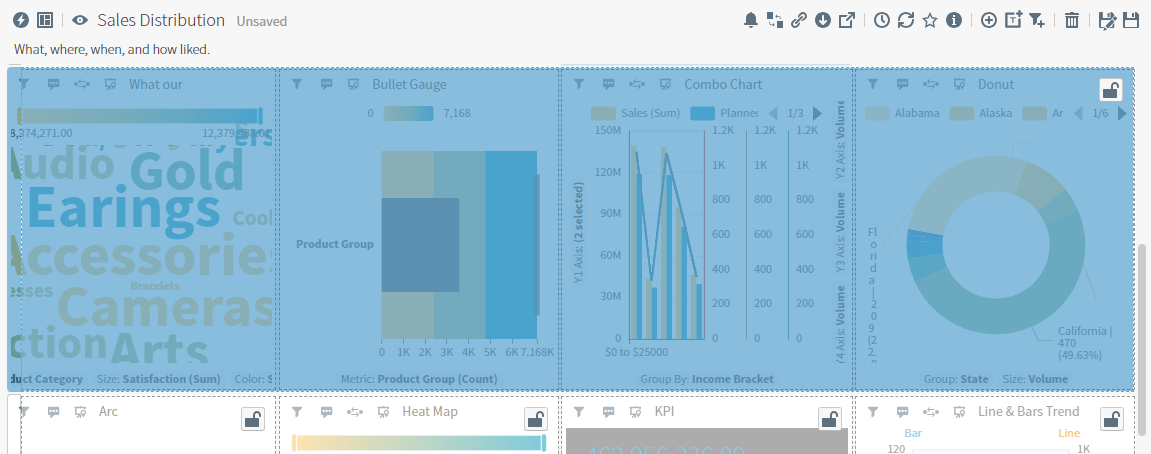
4. To lock or unlock a row of widgets, select the far left border of a row to highlight the row. The dashboard layout changes, displaying an unlocked icon on the selected unlocked row.
   <img src="https://mintcdn.com/insightsoftware/GTXU--ZlYc3DodOR/simba-embedded-analytics/docs/self-service-analytics/26.3/images/dashboards/locking-mode-03-23-2.png?fit=max&auto=format&n=GTXU--ZlYc3DodOR&q=85&s=f5af45de84ce15805ca805c5aa1c73e4" alt="" width="1151" height="454" data-path="simba-embedded-analytics/docs/self-service-analytics/26.3/images/dashboards/locking-mode-03-23-2.png" />

5. Select <img src="https://mintcdn.com/insightsoftware/1fCfZrK84x8KmAw8/simba-embedded-analytics/docs/self-service-analytics/26.3/images/icons/widget-unlock.png?fit=max&auto=format&n=1fCfZrK84x8KmAw8&q=85&s=ab0ba271cf45381dcda45c15a2160fe9" alt="" width="24" height="24" noZoom style={{display: 'inline', verticalAlign: 'middle', width: '24px', height: '24px', margin: '0 2px'}} data-path="simba-embedded-analytics/docs/self-service-analytics/26.3/images/icons/widget-unlock.png" /> to lock the row's height and position, or <img src="https://mintcdn.com/insightsoftware/1fCfZrK84x8KmAw8/simba-embedded-analytics/docs/self-service-analytics/26.3/images/icons/widget-lock.png?fit=max&auto=format&n=1fCfZrK84x8KmAw8&q=85&s=cc1b10e9971ece4df9baf88e86b56f58" alt="" width="24" height="24" noZoom style={{display: 'inline', verticalAlign: 'middle', width: '24px', height: '24px', margin: '0 2px'}} data-path="simba-embedded-analytics/docs/self-service-analytics/26.3/images/icons/widget-lock.png" /> to unlock the row.

6. Select the Dashboard Layout icon <img src="https://mintcdn.com/insightsoftware/sLccJ1EJ28cO5lT_/simba-embedded-analytics/docs/self-service-analytics/26.3/images/icons/dash-layout.png?fit=max&auto=format&n=sLccJ1EJ28cO5lT_&q=85&s=8ed911ffa50986e01a93f56edaffd320" alt="select to open the dashboard layout work area" width="24" height="24" noZoom data-path="simba-embedded-analytics/docs/self-service-analytics/26.3/images/icons/dash-layout.png" /> and disable the Locking Mode toggle.

7. Save your changes.

After you have locked the position of some of the widgets in your dashboard, you can not:

* Change the width of the locked layout column.
* Move the locked widgets.
* Change the height of a locked layout row or any layout row that includes locked widgets.
* Insert widgets next to or among some sides of locked widgets. Instead of a solid blue guidance line, Self-Service Analytics displays a gray dashed line.

You can swap an unlocked widget with a locked widget: select and drag an unlocked widget to swap it with a locked widget. See [Move, Swap, and Resize Visuals and Widgets in a Dashboard](#move-swap-and-resize-visuals-and-widgets-in-a-dashboard).

<h2 id="move-swap-and-resize-visuals-and-widgets-in-a-dashboard">
  Move, Swap, and Resize Visuals and Widgets in a Dashboard
</h2>

Self-Service Analytics's dashboard canvas is populated by information you add in widgets: visuals, rich text snippets, and filter snippets. Move and rearrange the sequence of these widgets, resize your widgets, or lock some in place by layout row or layout columns to present your information effectively on a variety of screen sizes. See [Use the Responsive Dashboard Layout](#use-the-responsive-dashboard-layout).

The dashboard layout works in a grid format, grouping widgets in rows and columns when you add them in [Edit mode](#use-dashboard-view-mode). Self-Service Analytics automatically adds new widgets in rows, up to 4 widgets side by side in a single row. You can move, swap, or resize widgets to include more in a variety of arrangements.

<Note>
  When you add a new widget, Self-Service Analytics automatically sizes it to fit in with existing widgets (if any) in a row. If your dashboard contains only one widget, you can not move or resize it; the widget takes up the entire dashboard area.
</Note>

### Widget Indicators

When you hover over or grab a widget to move, swap, or resize it, Self-Service Analytics may change your browser pointer to reflect an action you can take, such as resizing a widget, or can not take, such as resizing a locked widget. Additionally, indicators are shown in the dashboard itself, indicating where a widget will move to when you drop the widget.

<table>
  <thead>
    <tr>
      <th>Widget Indicator</th>
      <th>Description / Actions</th>
    </tr>
  </thead>

  <tbody>
    <tr>
      <td>
        <img src="https://mintcdn.com/insightsoftware/1fCfZrK84x8KmAw8/simba-embedded-analytics/docs/self-service-analytics/26.3/images/icons/widget-move.png?fit=max&auto=format&n=1fCfZrK84x8KmAw8&q=85&s=3134e5fcbf738e04efd28d03d5427034" alt="" width="30" height="30" noZoom style={{display: 'inline', verticalAlign: 'middle', width: '30px', height: '30px', margin: '0 2px'}} data-path="simba-embedded-analytics/docs/self-service-analytics/26.3/images/icons/widget-move.png" />
      </td>

      <td>
        Your browser pointer is hovering over a widget title pane or header, or hovering over a handle (<img src="https://mintcdn.com/insightsoftware/1fCfZrK84x8KmAw8/simba-embedded-analytics/docs/self-service-analytics/26.3/images/icons/widget-handle.png?fit=max&auto=format&n=1fCfZrK84x8KmAw8&q=85&s=cce1d5c36112514ea63f663c4092bc70" alt="" width="20" height="20" noZoom style={{display: 'inline', verticalAlign: 'middle', width: '20px', height: '20px', margin: '0 2px'}} data-path="simba-embedded-analytics/docs/self-service-analytics/26.3/images/icons/widget-handle.png" />) for minimally-sized widgets.

        <br />

        Select to grab and drag the widget to move or swap the widget.
      </td>
    </tr>

    <tr>
      <td>
        <img src="https://mintcdn.com/insightsoftware/1fCfZrK84x8KmAw8/simba-embedded-analytics/docs/self-service-analytics/26.3/images/icons/widget-handle.png?fit=max&auto=format&n=1fCfZrK84x8KmAw8&q=85&s=cce1d5c36112514ea63f663c4092bc70" alt="" width="40" height="40" noZoom style={{display: 'inline', verticalAlign: 'middle', width: '40px', height: '40px', margin: '0 2px'}} data-path="simba-embedded-analytics/docs/self-service-analytics/26.3/images/icons/widget-handle.png" />
      </td>

      <td>A handle you can select to grab and drag the widget for moving or swapping.</td>
    </tr>

    <tr>
      <td>
        <img src="https://mintcdn.com/insightsoftware/GTXU--ZlYc3DodOR/simba-embedded-analytics/docs/self-service-analytics/26.3/images/dashboards/drag-handle.png?fit=max&auto=format&n=GTXU--ZlYc3DodOR&q=85&s=3839a0fec9bb120d2e6b0b395d2a09c7" alt="" width="35" height="35" noZoom style={{display: 'inline', verticalAlign: 'middle', width: '35px', height: '35px', margin: '0 2px'}} data-path="simba-embedded-analytics/docs/self-service-analytics/26.3/images/dashboards/drag-handle.png" />
      </td>

      <td>A resizing handle you can select to resize the contents of your widget vertically and horizontally within the responsive row and column.</td>
    </tr>

    <tr>
      <td>
        <img src="https://mintcdn.com/insightsoftware/1fCfZrK84x8KmAw8/simba-embedded-analytics/docs/self-service-analytics/26.3/images/icons/widget-height.png?fit=max&auto=format&n=1fCfZrK84x8KmAw8&q=85&s=5edf6cbbce0f10c8a4a3f12613f876a2" alt="" width="39" height="39" noZoom style={{display: 'inline', verticalAlign: 'middle', width: '39px', height: '39px', margin: '0 2px'}} data-path="simba-embedded-analytics/docs/self-service-analytics/26.3/images/icons/widget-height.png" />
      </td>

      <td>
        Your browser pointer is hovering over the top or bottom of a widget row. Select to drag to resize the row and the widgets in it taller or shorter.

        <br />

        If you have stacked widgets in a column in the row, they are resized proportionally.
      </td>
    </tr>

    <tr>
      <td>
        <img src="https://mintcdn.com/insightsoftware/1fCfZrK84x8KmAw8/simba-embedded-analytics/docs/self-service-analytics/26.3/images/icons/widget-width.png?fit=max&auto=format&n=1fCfZrK84x8KmAw8&q=85&s=1255269f2aa6d0600b49ad4dbbd71aba" alt="" width="40" height="40" noZoom style={{display: 'inline', verticalAlign: 'middle', width: '40px', height: '40px', margin: '0 2px'}} data-path="simba-embedded-analytics/docs/self-service-analytics/26.3/images/icons/widget-width.png" />
      </td>

      <td>
        Your browser pointer is hovering over the left or right side of a widget column.

        <br />

        Select to drag and resize the column and the widgets in it wider or narrower.
      </td>
    </tr>

    <tr>
      <td>
        <img src="https://mintcdn.com/insightsoftware/1fCfZrK84x8KmAw8/simba-embedded-analytics/docs/self-service-analytics/26.3/images/icons/widget-no.png?fit=max&auto=format&n=1fCfZrK84x8KmAw8&q=85&s=393a53b19eb60cb19291406a0be110a4" alt="" width="40" height="40" noZoom style={{display: 'inline', verticalAlign: 'middle', width: '40px', height: '40px', margin: '0 2px'}} data-path="simba-embedded-analytics/docs/self-service-analytics/26.3/images/icons/widget-no.png" />
      </td>

      <td>You can not move, swap, or resize the widget you are dragging here.</td>
    </tr>

    <tr>
      <td>
        <img src="https://mintcdn.com/insightsoftware/1fCfZrK84x8KmAw8/simba-embedded-analytics/docs/self-service-analytics/26.3/images/icons/widget-swap.png?fit=max&auto=format&n=1fCfZrK84x8KmAw8&q=85&s=bd5c7bc6e56854f87b567115a5ae88c6" alt="" width="40" height="40" noZoom style={{display: 'inline', verticalAlign: 'middle', width: '40px', height: '40px', margin: '0 2px'}} data-path="simba-embedded-analytics/docs/self-service-analytics/26.3/images/icons/widget-swap.png" />
      </td>

      <td>
        Swap the widget you are dragging with the widget you are hovering over. The two widgets swap locations, each occupying the same footprint and position as each original widget. You can swap widgets not locked in place with widgets that are locked in a dashboard.

        <br />

        See [Lock and Unlock Widget Positions](#lock-and-unlock-widget-positions).
      </td>
    </tr>

    <tr>
      <td>
        <img src="https://mintcdn.com/insightsoftware/1fCfZrK84x8KmAw8/simba-embedded-analytics/docs/self-service-analytics/26.3/images/icons/widget-insert.png?fit=max&auto=format&n=1fCfZrK84x8KmAw8&q=85&s=7c499ba4b66b2b4ae4e72c6957304d96" alt="" width="40" height="40" noZoom style={{display: 'inline', verticalAlign: 'middle', width: '40px', height: '40px', margin: '0 2px'}} data-path="simba-embedded-analytics/docs/self-service-analytics/26.3/images/icons/widget-insert.png" />
      </td>

      <td>
        Insert the widget you are dragging next to the widget, widget column, or widget row, as indicated by a solid blue guidance line at the insertion point. Drop your widget when the solid blue line is alongside the position you want.

        <br />

        * Widget: Drag a widget above, below, or next to another widget.
        * Widget column: Drag a widget above, below, or next to a widget to stack them together in the same layout row or layout column.
        * Widget row: Drag a widget above or below a row to insert the widget as a new row.

        <br />

        <Note>
          If a widget position is row or column locked, the solid blue guidance line is a dashed gray line, indicating a widget can not be inserted in the position you want. See [Lock and Unlock Widget Positions](#lock-and-unlock-widget-positions).
        </Note>
      </td>
    </tr>
  </tbody>
</table>

#### Move Widgets

After you have added two or more widgets of any type to your dashboard, you can rearrange the widgets to position your visuals, rich text snippets, or filter snippets in a layout convenient to your users. To move a widget to a specific place on your dashboard, grab it by the title pane, header, or handle (<img src="https://mintcdn.com/insightsoftware/1fCfZrK84x8KmAw8/simba-embedded-analytics/docs/self-service-analytics/26.3/images/icons/widget-handle.png?fit=max&auto=format&n=1fCfZrK84x8KmAw8&q=85&s=cce1d5c36112514ea63f663c4092bc70" alt="" width="20" height="20" noZoom style={{display: 'inline', verticalAlign: 'middle', width: '20px', height: '20px', margin: '0 2px'}} data-path="simba-embedded-analytics/docs/self-service-analytics/26.3/images/icons/widget-handle.png" />) while in [edit mode](#use-dashboard-view-mode), then drag and drop to the desired location.

#### Swap Widgets

After you have added two or more widgets of any type to your dashboard, swap widgets quickly and easily to reorder their position in the dashboard.

* To swap unlocked widgets, grab one by the title pane, header, or handle while in [edit mode](#use-dashboard-view-mode), then drag and drop over the widget you want to swap it with.
* To swap an unlocked widget with a locked widget, grab the unlocked widget by the title pane, header, or handle while in [edit mode](#use-dashboard-view-mode), then drag and drop over the widget you want to swap it with.
* To swap locked widgets, unlock at least one widget, swap the widgets, then relock the widgets. See [Lock and Unlock Widget Positions](#lock-and-unlock-widget-positions).

#### Resize Widgets

After you have added two or more widgets of any type to your dashboard, you can resize the widgets to display the information more clearly. For example, pair a wide visual chart with a narrow rich text snippet of information to give context to your data.

**Resize a widget**

1. Select an unlocked widget in a dashboard you have open in [Edit mode](#use-dashboard-view-mode).
2. Drag it by the handle (<img src="https://mintcdn.com/insightsoftware/1fCfZrK84x8KmAw8/simba-embedded-analytics/docs/self-service-analytics/26.3/images/icons/widget-height.png?fit=max&auto=format&n=1fCfZrK84x8KmAw8&q=85&s=5edf6cbbce0f10c8a4a3f12613f876a2" alt="" width="24" height="24" noZoom style={{display: 'inline', verticalAlign: 'middle', width: '24px', height: '24px', margin: '0 2px'}} data-path="simba-embedded-analytics/docs/self-service-analytics/26.3/images/icons/widget-height.png" />) from an available side (top or bottom) to make it and the widgets in its row taller or shorter. Minimum height for a widget is 50 pixels.
3. Drag it by the handle (<img src="https://mintcdn.com/insightsoftware/1fCfZrK84x8KmAw8/simba-embedded-analytics/docs/self-service-analytics/26.3/images/icons/widget-width.png?fit=max&auto=format&n=1fCfZrK84x8KmAw8&q=85&s=1255269f2aa6d0600b49ad4dbbd71aba" alt="" width="24" height="24" noZoom style={{display: 'inline', verticalAlign: 'middle', width: '24px', height: '24px', margin: '0 2px'}} data-path="simba-embedded-analytics/docs/self-service-analytics/26.3/images/icons/widget-width.png" />) from an available side (left or right) to make it and the widgets in the column narrower or wider.
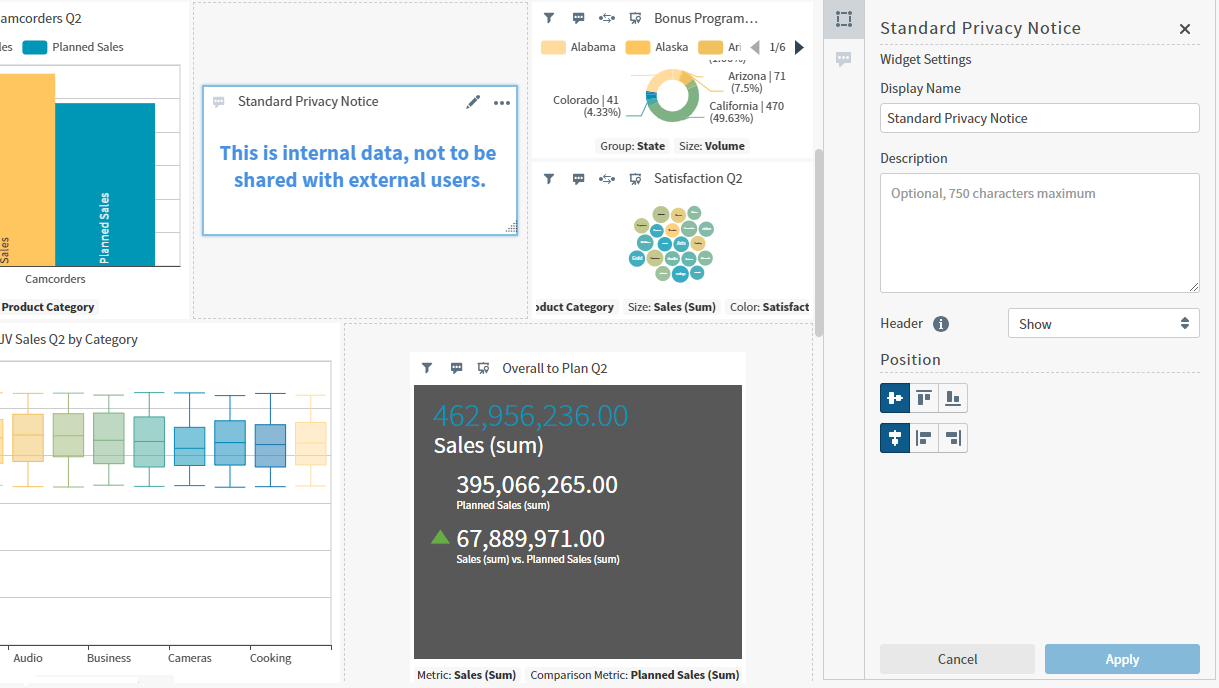
4. Alternatively, drag it horizontally, vertically, or diagonally using the resize handle (<img src="https://mintcdn.com/insightsoftware/GTXU--ZlYc3DodOR/simba-embedded-analytics/docs/self-service-analytics/26.3/images/dashboards/drag-handle.png?fit=max&auto=format&n=GTXU--ZlYc3DodOR&q=85&s=3839a0fec9bb120d2e6b0b395d2a09c7" alt="" width="20" height="20" noZoom style={{display: 'inline', verticalAlign: 'middle', width: '20px', height: '20px', margin: '0 2px'}} data-path="simba-embedded-analytics/docs/self-service-analytics/26.3/images/dashboards/drag-handle.png" />). Adjust the Position options for the widget in the Widget Settings sidebar menu to frame it appropriately in the widget cell.
5. Save your changes.

<h3 id="position-resized-widgets">
  Position Resized Widgets
</h3>

After you have used the resizing handle (<img src="https://mintcdn.com/insightsoftware/GTXU--ZlYc3DodOR/simba-embedded-analytics/docs/self-service-analytics/26.3/images/dashboards/drag-handle.png?fit=max&auto=format&n=GTXU--ZlYc3DodOR&q=85&s=3839a0fec9bb120d2e6b0b395d2a09c7" alt="" width="20" height="20" noZoom style={{display: 'inline', verticalAlign: 'middle', width: '20px', height: '20px', margin: '0 2px'}} data-path="simba-embedded-analytics/docs/self-service-analytics/26.3/images/dashboards/drag-handle.png" />) to resize the contents of a widget, select a Position option to align it the way you want in the widget cell in the Widget Settings panel. When you select a position option, the icon colors invert to indicate the selection. Select **Apply** to align the widget using your new selections.

| Position Alignment                                                                                                                                                                                                                                                                                                                                                                                                                                                                                                                                                                                                                                                                                                                                                                                                                                                                                                                                                                                                                                                                                                                                                                                                                                                                                                                                                                                                                                                                                                                                                                                                                                                                                                                                                                                                                                                                                                                                                                                                                                                                                                               | Description                                                                   |
| -------------------------------------------------------------------------------------------------------------------------------------------------------------------------------------------------------------------------------------------------------------------------------------------------------------------------------------------------------------------------------------------------------------------------------------------------------------------------------------------------------------------------------------------------------------------------------------------------------------------------------------------------------------------------------------------------------------------------------------------------------------------------------------------------------------------------------------------------------------------------------------------------------------------------------------------------------------------------------------------------------------------------------------------------------------------------------------------------------------------------------------------------------------------------------------------------------------------------------------------------------------------------------------------------------------------------------------------------------------------------------------------------------------------------------------------------------------------------------------------------------------------------------------------------------------------------------------------------------------------------------------------------------------------------------------------------------------------------------------------------------------------------------------------------------------------------------------------------------------------------------------------------------------------------------------------------------------------------------------------------------------------------------------------------------------------------------------------------------------------------------- | ----------------------------------------------------------------------------- |
| <img src="https://mintcdn.com/insightsoftware/GTXU--ZlYc3DodOR/simba-embedded-analytics/docs/self-service-analytics/26.3/images/dashboards/wgt-pos-center-horz.png?fit=max&auto=format&n=GTXU--ZlYc3DodOR&q=85&s=4b9c217e9e81fa5a64200d32b8729884" alt="" width="60" height="30" noZoom style={{display: 'inline', verticalAlign: 'middle', width: '60px', height: '30px', margin: '0 2px'}} data-path="simba-embedded-analytics/docs/self-service-analytics/26.3/images/dashboards/wgt-pos-center-horz.png" /> | Select to align the widget centered, horizontally.                            |
| <img src="https://mintcdn.com/insightsoftware/GTXU--ZlYc3DodOR/simba-embedded-analytics/docs/self-service-analytics/26.3/images/dashboards/wgt-pos-top-horz.png?fit=max&auto=format&n=GTXU--ZlYc3DodOR&q=85&s=5d9a28af6385555f5b51b7748bd1f1fe" alt="" width="60" height="30" noZoom style={{display: 'inline', verticalAlign: 'middle', width: '60px', height: '30px', margin: '0 2px'}} data-path="simba-embedded-analytics/docs/self-service-analytics/26.3/images/dashboards/wgt-pos-top-horz.png" />                         | Select to align the widget at the top of the available area, horizontally.    |
| <img src="https://mintcdn.com/insightsoftware/GTXU--ZlYc3DodOR/simba-embedded-analytics/docs/self-service-analytics/26.3/images/dashboards/wgt-pos-bot-horz.png?fit=max&auto=format&n=GTXU--ZlYc3DodOR&q=85&s=ff7409fa3fe84c4f8b5c8037ca204f6f" alt="" width="61" height="30" noZoom style={{display: 'inline', verticalAlign: 'middle', width: '61px', height: '30px', margin: '0 2px'}} data-path="simba-embedded-analytics/docs/self-service-analytics/26.3/images/dashboards/wgt-pos-bot-horz.png" />                         | Select to align the widget at the bottom of the available area, horizontally. |
| <img src="https://mintcdn.com/insightsoftware/GTXU--ZlYc3DodOR/simba-embedded-analytics/docs/self-service-analytics/26.3/images/dashboards/wgt-pos-center-vert.png?fit=max&auto=format&n=GTXU--ZlYc3DodOR&q=85&s=dc1654e0ee5980e07cc4f89bcd515fe2" alt="" width="60" height="30" noZoom style={{display: 'inline', verticalAlign: 'middle', width: '60px', height: '30px', margin: '0 2px'}} data-path="simba-embedded-analytics/docs/self-service-analytics/26.3/images/dashboards/wgt-pos-center-vert.png" /> | Select to align the widget centered, vertically.                              |
| <img src="https://mintcdn.com/insightsoftware/GTXU--ZlYc3DodOR/simba-embedded-analytics/docs/self-service-analytics/26.3/images/dashboards/wgt-pos-left-vert.png?fit=max&auto=format&n=GTXU--ZlYc3DodOR&q=85&s=b01dc0316c8ea1a73a17cd230c71e2e8" alt="" width="60" height="30" noZoom style={{display: 'inline', verticalAlign: 'middle', width: '60px', height: '30px', margin: '0 2px'}} data-path="simba-embedded-analytics/docs/self-service-analytics/26.3/images/dashboards/wgt-pos-left-vert.png" />                 | Select to align the widget to the left of the available area, vertically.     |
| <img src="https://mintcdn.com/insightsoftware/GTXU--ZlYc3DodOR/simba-embedded-analytics/docs/self-service-analytics/26.3/images/dashboards/wgt-pos-right-vert.png?fit=max&auto=format&n=GTXU--ZlYc3DodOR&q=85&s=aaa9b210cd95a810ab64f8eb65b46992" alt="" width="60" height="30" noZoom style={{display: 'inline', verticalAlign: 'middle', width: '60px', height: '30px', margin: '0 2px'}} data-path="simba-embedded-analytics/docs/self-service-analytics/26.3/images/dashboards/wgt-pos-right-vert.png" />         | Select to align the widget at the right of the available area, vertically.    |

<img src="https://mintcdn.com/insightsoftware/GTXU--ZlYc3DodOR/simba-embedded-analytics/docs/self-service-analytics/26.3/images/dashboards/repositon-resized-widgets-23-3.png?fit=max&auto=format&n=GTXU--ZlYc3DodOR&q=85&s=617be44808bef01ef6061f2db7957789" alt="Use the Position work area of the Widget Settings panel to position a floating widget in a widget cell" width="1219" height="688" data-path="simba-embedded-analytics/docs/self-service-analytics/26.3/images/dashboards/repositon-resized-widgets-23-3.png" />

### Placement Indicators

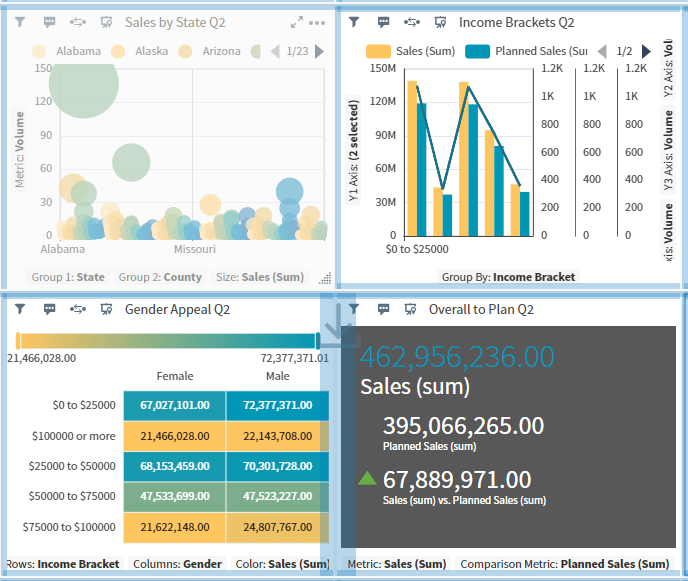
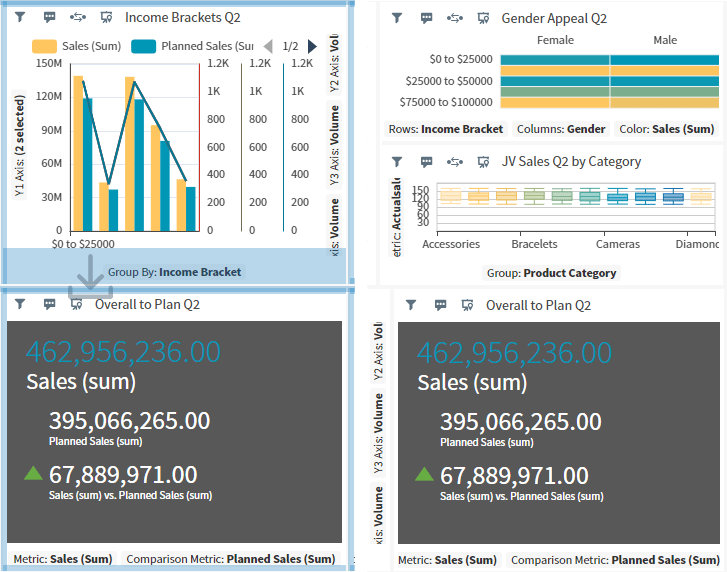
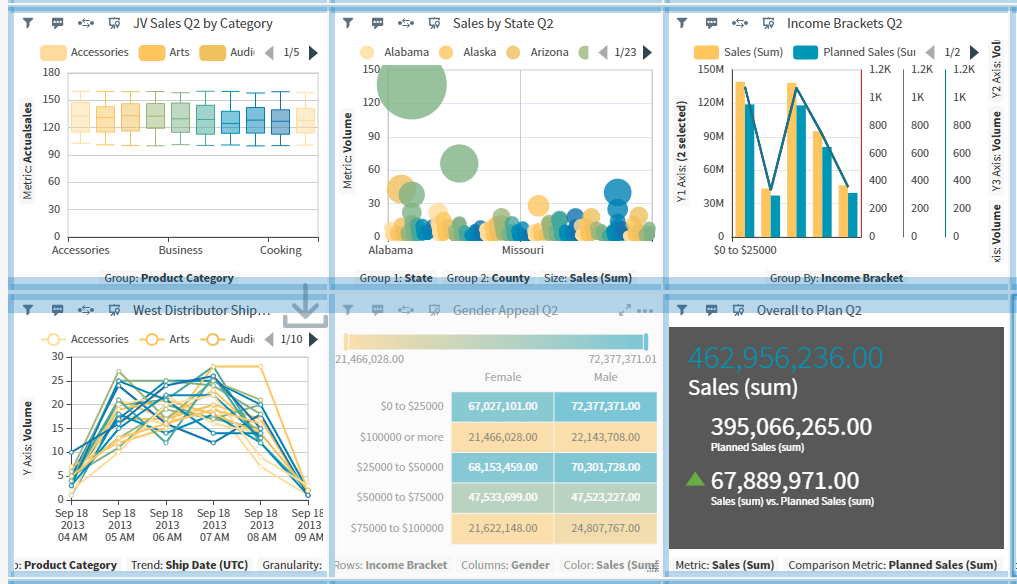
Placement indicators help you see where you can move a widget you have selected to drag and reposition. A wide bar appears along the edge of the target widgets when you attempt to reposition a widget above, below, or alongside a widget, or as a new row between widget rows.

<img src="https://mintcdn.com/insightsoftware/GTXU--ZlYc3DodOR/simba-embedded-analytics/docs/self-service-analytics/26.3/images/dashboards/reposition-between-widgets-23-2.png?fit=max&auto=format&n=GTXU--ZlYc3DodOR&q=85&s=6cafbd349403077ed8e3279015f65bd3" alt="Repositioning a widget between widgets" width="688" height="581" data-path="simba-embedded-analytics/docs/self-service-analytics/26.3/images/dashboards/reposition-between-widgets-23-2.png" />

<img src="https://mintcdn.com/insightsoftware/GTXU--ZlYc3DodOR/simba-embedded-analytics/docs/self-service-analytics/26.3/images/dashboards/reposition-alongside-23-2.png?fit=max&auto=format&n=GTXU--ZlYc3DodOR&q=85&s=9969e40ec1302ff2f603542ff863b440" alt="Repositioning a widget alongside widgets" width="727" height="572" data-path="simba-embedded-analytics/docs/self-service-analytics/26.3/images/dashboards/reposition-alongside-23-2.png" />

<img src="https://mintcdn.com/insightsoftware/GTXU--ZlYc3DodOR/simba-embedded-analytics/docs/self-service-analytics/26.3/images/dashboards/reposition-new-widget-row-23-2.png?fit=max&auto=format&n=GTXU--ZlYc3DodOR&q=85&s=0fefe731543c5ac2b17d51e0c5f4a799" alt="Creating a new widget row" width="1017" height="584" data-path="simba-embedded-analytics/docs/self-service-analytics/26.3/images/dashboards/reposition-new-widget-row-23-2.png" />

<h2 id="use-the-dashboard-icons">
  Use the Dashboard Icons
</h2>

When you create or edit a dashboard, a series of icons are available you can use to perform specific dashboard functions.

<img src="https://mintcdn.com/insightsoftware/2cXq_sDOxrDVXUcv/simba-embedded-analytics/docs/self-service-analytics/26.3/images/dashboards/dashboard-icons-left-23-2.png?fit=max&auto=format&n=2cXq_sDOxrDVXUcv&q=85&s=a6a699fb2fb3a0d2b1b85f2594bb3006" alt="manage your dashboard layout and enable view mode" width="222" height="63" data-path="simba-embedded-analytics/docs/self-service-analytics/26.3/images/dashboards/dashboard-icons-left-23-2.png" />

<img src="https://mintcdn.com/insightsoftware/2cXq_sDOxrDVXUcv/simba-embedded-analytics/docs/self-service-analytics/26.3/images/dashboards/dashboard-icons-right-23-2.png?fit=max&auto=format&n=2cXq_sDOxrDVXUcv&q=85&s=3109c7f8203a566ca940a2335c2e135d" alt="options available for dashboards for sharing, exporting, adding widgets and more" width="890" height="63" data-path="simba-embedded-analytics/docs/self-service-analytics/26.3/images/dashboards/dashboard-icons-right-23-2.png" />

Select an icon to perform a dashboard function, as described in the following table.

<Note>
  The visibility of these icons on a dashboard are affected by dashboard interactivity settings. See [Control How Users Interact With a Dashboard](/simba-embedded-analytics/docs/self-service-analytics/26.3/analyze-data/dashboards/dash-interactivity).
</Note>

| Icon                                                                                                                                                                                                                                                                                                                                                                                                                                                                                                                                                                                                                                                                                                                                                                                                                                                                                                                                                                                                                                                                                                                                                                                                                                                                                                                                                                                                                                                                                                                                                                                                                                                                                                                                                                                                                                                                                                                                                                                                                                                                                                                                                                   | Description                                                                                                                                                                                                                                                                                                                                                                                                                                                                                                                                                                                                                                                                                                                                                                                                                                                                                                                                                                                                                                                                                                                                                                                                                                                                                                                                                                                                                                                                                                                                                                                                                                                                                                                                                                                                                                                                                                                                                                                                                                                                                                                                                                                                                            |
| ---------------------------------------------------------------------------------------------------------------------------------------------------------------------------------------------------------------------------------------------------------------------------------------------------------------------------------------------------------------------------------------------------------------------------------------------------------------------------------------------------------------------------------------------------------------------------------------------------------------------------------------------------------------------------------------------------------------------------------------------------------------------------------------------------------------------------------------------------------------------------------------------------------------------------------------------------------------------------------------------------------------------------------------------------------------------------------------------------------------------------------------------------------------------------------------------------------------------------------------------------------------------------------------------------------------------------------------------------------------------------------------------------------------------------------------------------------------------------------------------------------------------------------------------------------------------------------------------------------------------------------------------------------------------------------------------------------------------------------------------------------------------------------------------------------------------------------------------------------------------------------------------------------------------------------------------------------------------------------------------------------------------------------------------------------------------------------------------------------------------------------------------------------------------- | -------------------------------------------------------------------------------------------------------------------------------------------------------------------------------------------------------------------------------------------------------------------------------------------------------------------------------------------------------------------------------------------------------------------------------------------------------------------------------------------------------------------------------------------------------------------------------------------------------------------------------------------------------------------------------------------------------------------------------------------------------------------------------------------------------------------------------------------------------------------------------------------------------------------------------------------------------------------------------------------------------------------------------------------------------------------------------------------------------------------------------------------------------------------------------------------------------------------------------------------------------------------------------------------------------------------------------------------------------------------------------------------------------------------------------------------------------------------------------------------------------------------------------------------------------------------------------------------------------------------------------------------------------------------------------------------------------------------------------------------------------------------------------------------------------------------------------------------------------------------------------------------------------------------------------------------------------------------------------------------------------------------------------------------------------------------------------------------------------------------------------------------------------------------------------------------------------------------------------------- |
| <img src="https://mintcdn.com/insightsoftware/sLccJ1EJ28cO5lT_/simba-embedded-analytics/docs/self-service-analytics/26.3/images/icons/filter-vis.png?fit=max&auto=format&n=sLccJ1EJ28cO5lT_&q=85&s=0a044ea0662c55e06133074a55d93cd9" alt="select the filter icon to open the filters sidebar and add or edit filters" width="17" height="17" noZoom style={{display: 'inline', verticalAlign: 'middle', width: '17px', height: '17px', margin: '0 2px'}} data-path="simba-embedded-analytics/docs/self-service-analytics/26.3/images/icons/filter-vis.png" />                                                                               | Filter the data on a dashboard. Available only when all visuals on a dashboard are from the same data source.                                                                                                                                                                                                                                                                                                                                                                                                                                                                                                                                                                                                                                                                                                                                                                                                                                                                                                                                                                                                                                                                                                                                                                                                                                                                                                                                                                                                                                                                                                                                                                                                                                                                                                                                                                                                                                                                                                                                                                                                                                                                                                                          |
| <img src="https://mintcdn.com/insightsoftware/1fCfZrK84x8KmAw8/simba-embedded-analytics/docs/self-service-analytics/26.3/images/icons/sidebar-interactive.png?fit=max&auto=format&n=1fCfZrK84x8KmAw8&q=85&s=5068072b72f71db3c65f6eed78658798" alt="select the interactivity icon to adjust the interactivity settings for this item" width="27" height="27" noZoom style={{display: 'inline', verticalAlign: 'middle', width: '27px', height: '27px', margin: '0 2px'}} data-path="simba-embedded-analytics/docs/self-service-analytics/26.3/images/icons/sidebar-interactive.png" /> | Open dashboard and visual interactivity settings. See [Control How Users Interact With a Dashboard](/simba-embedded-analytics/docs/self-service-analytics/26.3/analyze-data/dashboards/dash-interactivity).                                                                                                                                                                                                                                                                                                                                                                                                                                                                                                                                                                                                                                                                                                                                                                                                                                                                                                                                                                                                                                                                                                                                                                                                                                                                                                                                                                                                                                                                                                                                                                                                                                                                                                                                                                                                                                                                                                                                                                                                                            |
| <img src="https://mintcdn.com/insightsoftware/sLccJ1EJ28cO5lT_/simba-embedded-analytics/docs/self-service-analytics/26.3/images/icons/dash-layout.png?fit=max&auto=format&n=sLccJ1EJ28cO5lT_&q=85&s=8ed911ffa50986e01a93f56edaffd320" alt="select to open the dashboard layout work area" width="46" height="46" noZoom style={{display: 'inline', verticalAlign: 'middle', width: '46px', height: '46px', margin: '0 2px'}} data-path="simba-embedded-analytics/docs/self-service-analytics/26.3/images/icons/dash-layout.png" />                                                                                                    | Select to open the Dashboard Layout work area.                                                                                                                                                                                                                                                                                                                                                                                                                                                                                                                                                                                                                                                                                                                                                                                                                                                                                                                                                                                                                                                                                                                                                                                                                                                                                                                                                                                                                                                                                                                                                                                                                                                                                                                                                                                                                                                                                                                                                                                                                                                                                                                                                                                         |
|                                                                                                                                                                                                                                                                                                                                                                                                                                                                                                                                                                                                                                                                                                                                                                                                                                                                                                                                                                                                                                                                                                                                                                                                                                                                                                                                                                                                                                                                                                                                                                                                                                                                                                                                                                                                                                                                                                                                                                                                                                                                                                                                                                        | <img src="https://mintcdn.com/insightsoftware/sLccJ1EJ28cO5lT_/simba-embedded-analytics/docs/self-service-analytics/26.3/images/icons/responsive-lock-23-1.png?fit=max&auto=format&n=sLccJ1EJ28cO5lT_&q=85&s=8c5e612a5ec7c073c08e9aae84cc2bdd" alt="select to control the locking and unlocking of widgets on the canvas" width="24" height="24" noZoom data-path="simba-embedded-analytics/docs/self-service-analytics/26.3/images/icons/responsive-lock-23-1.png" /> Enable and disable the toggle to control widget locking in this dashboard. See [Lock and Unlock Widget Positions](#lock-and-unlock-widget-positions).                  |
|                                                                                                                                                                                                                                                                                                                                                                                                                                                                                                                                                                                                                                                                                                                                                                                                                                                                                                                                                                                                                                                                                                                                                                                                                                                                                                                                                                                                                                                                                                                                                                                                                                                                                                                                                                                                                                                                                                                                                                                                                                                                                                                                                                        | <img src="https://mintcdn.com/insightsoftware/sLccJ1EJ28cO5lT_/simba-embedded-analytics/docs/self-service-analytics/26.3/images/icons/responsive-disabled-23-1.png?fit=max&auto=format&n=sLccJ1EJ28cO5lT_&q=85&s=60767814979ab1559a1f32c7988a089e" alt="select to turn responsive layout on and off" width="24" height="24" noZoom data-path="simba-embedded-analytics/docs/self-service-analytics/26.3/images/icons/responsive-disabled-23-1.png" /> Enable and disable the toggle to control responsive layout for this dashboard. See [Use the Responsive Dashboard Layout](#use-the-responsive-dashboard-layout). |
|                                                                                                                                                                                                                                                                                                                                                                                                                                                                                                                                                                                                                                                                                                                                                                                                                                                                                                                                                                                                                                                                                                                                                                                                                                                                                                                                                                                                                                                                                                                                                                                                                                                                                                                                                                                                                                                                                                                                                                                                                                                                                                                                                                        | Set the minimum widget width and height. See [Use the Responsive Dashboard Layout](#use-the-responsive-dashboard-layout).                                                                                                                                                                                                                                                                                                                                                                                                                                                                                                                                                                                                                                                                                                                                                                                                                                                                                                                                                                                                                                                                                                                                                                                                                                                                                                                                                                                                                                                                                                                                                                                                                                                                                                                                                                                                                                                                                                                                                                                                                                                                                                              |
| <img src="https://mintcdn.com/insightsoftware/1fCfZrK84x8KmAw8/simba-embedded-analytics/docs/self-service-analytics/26.3/images/icons/viewer-editor-toggle.png?fit=max&auto=format&n=1fCfZrK84x8KmAw8&q=85&s=16859ffbaed0453d0d2a8dbb4201c5f9" alt="select to toggle between edit and view modes" width="20" height="21" noZoom data-path="simba-embedded-analytics/docs/self-service-analytics/26.3/images/icons/viewer-editor-toggle.png" />                                                                                                                                  | Toggle dashboard view mode between Viewer and Editor modes. See [Use Dashboard View Mode](#use-dashboard-view-mode).                                                                                                                                                                                                                                                                                                                                                                                                                                                                                                                                                                                                                                                                                                                                                                                                                                                                                                                                                                                                                                                                                                                                                                                                                                                                                                                                                                                                                                                                                                                                                                                                                                                                                                                                                                                                                                                                                                                                                                                                                                                                                                                   |
| <img src="https://mintcdn.com/insightsoftware/sLccJ1EJ28cO5lT_/simba-embedded-analytics/docs/self-service-analytics/26.3/images/icons/dash-search.png?fit=max&auto=format&n=sLccJ1EJ28cO5lT_&q=85&s=c921faed41ab6b7b31a811296d2fdb88" alt="select to search among objects showing in the work area" width="25" height="25" noZoom data-path="simba-embedded-analytics/docs/self-service-analytics/26.3/images/icons/dash-search.png" />                                                                                                                                                                                               | Search visuals content in the dashboard, if supported by the source.                                                                                                                                                                                                                                                                                                                                                                                                                                                                                                                                                                                                                                                                                                                                                                                                                                                                                                                                                                                                                                                                                                                                                                                                                                                                                                                                                                                                                                                                                                                                                                                                                                                                                                                                                                                                                                                                                                                                                                                                                                                                                                                                                                   |
| <img src="https://mintcdn.com/insightsoftware/sLccJ1EJ28cO5lT_/simba-embedded-analytics/docs/self-service-analytics/26.3/images/icons/alert.png?fit=max&auto=format&n=sLccJ1EJ28cO5lT_&q=85&s=483e2b94aeb3aceb00d26f4b19728c88" alt="select to manage alerts" width="25" height="25" noZoom data-path="simba-embedded-analytics/docs/self-service-analytics/26.3/images/icons/alert.png" />                                                                                                                                                                                                                                                                               | Manage alerts. See [Alerts](/simba-embedded-analytics/docs/self-service-analytics/26.3/analyze-data/alerts/alerts-ov)                                                                                                                                                                                                                                                                                                                                                                                                                                                                                                                                                                                                                                                                                                                                                                                                                                                                                                                                                                                                                                                                                                                                                                                                                                                                                                                                                                                                                                                                                                                                                                                                                                                                                                                                                                                                                                                                                                                                                                                                                                                                                                                  |
| <img src="https://mintcdn.com/insightsoftware/2cXq_sDOxrDVXUcv/simba-embedded-analytics/docs/self-service-analytics/26.3/images/dashboards/dash-xsourcelink.png?fit=max&auto=format&n=2cXq_sDOxrDVXUcv&q=85&s=a0bac4bcf53aa484043898173bc91e9b" alt="select to manage cross source links in your environment" width="23" height="22" noZoom style={{display: 'inline', verticalAlign: 'middle', width: '23px', height: '22px', margin: '0 2px'}} data-path="simba-embedded-analytics/docs/self-service-analytics/26.3/images/dashboards/dash-xsourcelink.png" />          | Link fields between disparate data sources to create cross-source links. See [Use Cross-Source Links](/simba-embedded-analytics/docs/self-service-analytics/26.3/analyze-data/filters/using-cross-source-links).                                                                                                                                                                                                                                                                                                                                                                                                                                                                                                                                                                                                                                                                                                                                                                                                                                                                                                                                                                                                                                                                                                                                                                                                                                                                                                                                                                                                                                                                                                                                                                                                                                                                                                                                                                                                                                                                                                                                                                                                                       |
| <img src="https://mintcdn.com/insightsoftware/2cXq_sDOxrDVXUcv/simba-embedded-analytics/docs/self-service-analytics/26.3/images/dashboards/dash-link.png?fit=max&auto=format&n=2cXq_sDOxrDVXUcv&q=85&s=6b46f3f4e6fa2bdc72ae8dee012401c0" alt="select to manage dashboard links and visual links" width="21" height="21" noZoom style={{display: 'inline', verticalAlign: 'middle', width: '21px', height: '21px', margin: '0 2px'}} data-path="simba-embedded-analytics/docs/self-service-analytics/26.3/images/dashboards/dash-link.png" />                                                                        | Link dashboard visuals to other dashboards. See [Link a Dashboard](/simba-embedded-analytics/docs/self-service-analytics/26.3/analyze-data/dashboards/dash-interactivity#link-a-dashboard).                                                                                                                                                                                                                                                                                                                                                                                                                                                                                                                                                                                                                                                                                                                                                                                                                                                                                                                                                                                                                                                                                                                                                                                                                                                                                                                                                                                                                                                                                                                                                                                                                                                                                                                                                                                                                                                                                                                                                                                                                                            |
| <img src="https://mintcdn.com/insightsoftware/2cXq_sDOxrDVXUcv/simba-embedded-analytics/docs/self-service-analytics/26.3/images/dashboards/dash-export.png?fit=max&auto=format&n=2cXq_sDOxrDVXUcv&q=85&s=e8b1d12ba47dbfb0aa811319cc4af59b" alt="select to export this item" width="23" height="24" noZoom style={{display: 'inline', verticalAlign: 'middle', width: '23px', height: '24px', margin: '0 2px'}} data-path="simba-embedded-analytics/docs/self-service-analytics/26.3/images/dashboards/dash-export.png" />                                                                               | Export a dashboard. The Export drop-down menu appears. See [Export Dashboards](/simba-embedded-analytics/docs/self-service-analytics/26.3/analyze-data/dashboards/dash-import#export-dashboards).                                                                                                                                                                                                                                                                                                                                                                                                                                                                                                                                                                                                                                                                                                                                                                                                                                                                                                                                                                                                                                                                                                                                                                                                                                                                                                                                                                                                                                                                                                                                                                                                                                                                                                                                                                                                                                                                                                                                                                                                                                      |
| <img src="https://mintcdn.com/insightsoftware/sLccJ1EJ28cO5lT_/simba-embedded-analytics/docs/self-service-analytics/26.3/images/icons/share-dash-22-4.png?fit=max&auto=format&n=sLccJ1EJ28cO5lT_&q=85&s=2845181af743f45892dc64f7fe42f0eb" alt="select to share a visual, dashboard, or report" width="32" height="32" noZoom style={{display: 'inline', verticalAlign: 'middle', width: '32px', height: '32px', margin: '0 2px'}} data-path="simba-embedded-analytics/docs/self-service-analytics/26.3/images/icons/share-dash-22-4.png" />                                                                   | Share a dashboard. The Share dashboard work area opens. See [Share a Dashboard or Self Service Report with Users](/simba-embedded-analytics/docs/self-service-analytics/26.3/analyze-data/dashboards/dash-share-withinacct).                                                                                                                                                                                                                                                                                                                                                                                                                                                                                                                                                                                                                                                                                                                                                                                                                                                                                                                                                                                                                                                                                                                                                                                                                                                                                                                                                                                                                                                                                                                                                                                                                                                                                                                                                                                                                                                                                                                                                                                                           |
| <img src="https://mintcdn.com/insightsoftware/sLccJ1EJ28cO5lT_/simba-embedded-analytics/docs/self-service-analytics/26.3/images/icons/dashboard-schedule.png?fit=max&auto=format&n=sLccJ1EJ28cO5lT_&q=85&s=9e7a1179faaedda7e8026e3ccd40ddcd" alt="select the schedule report icon to schedule a dashboard or report with others" width="18" height="18" noZoom style={{display: 'inline', verticalAlign: 'middle', width: '18px', height: '18px', margin: '0 2px'}} data-path="simba-embedded-analytics/docs/self-service-analytics/26.3/images/icons/dashboard-schedule.png" />            | Schedule dashboard reports. The Scheduled Reports work area opens. See [Schedule a Self Service Report or Dashboard Report](/simba-embedded-analytics/docs/self-service-analytics/26.3/analyze-data/dashboards/dash-schedule#schedule-a-self-service-report-or-dashboard-report).                                                                                                                                                                                                                                                                                                                                                                                                                                                                                                                                                                                                                                                                                                                                                                                                                                                                                                                                                                                                                                                                                                                                                                                                                                                                                                                                                                                                                                                                                                                                                                                                                                                                                                                                                                                                                                                                                                                                                      |
| <img src="https://mintcdn.com/insightsoftware/2cXq_sDOxrDVXUcv/simba-embedded-analytics/docs/self-service-analytics/26.3/images/dashboards/dash-refresh.png?fit=max&auto=format&n=2cXq_sDOxrDVXUcv&q=85&s=53cc532b6fce4e41f7756425d1b87639" alt="select to refresh the underlying data behind an object, or the specific field" width="34" height="34" noZoom style={{display: 'inline', verticalAlign: 'middle', width: '34px', height: '34px', margin: '0 2px'}} data-path="simba-embedded-analytics/docs/self-service-analytics/26.3/images/dashboards/dash-refresh.png" />                    | Refresh the data on the dashboard. See [Refresh Data on a Dashboard](/simba-embedded-analytics/docs/self-service-analytics/26.3/analyze-data/dashboards/dash-manage#refresh-data-on-a-dashboard).                                                                                                                                                                                                                                                                                                                                                                                                                                                                                                                                                                                                                                                                                                                                                                                                                                                                                                                                                                                                                                                                                                                                                                                                                                                                                                                                                                                                                                                                                                                                                                                                                                                                                                                                                                                                                                                                                                                                                                                                                                      |
| <img src="https://mintcdn.com/insightsoftware/2cXq_sDOxrDVXUcv/simba-embedded-analytics/docs/self-service-analytics/26.3/images/dashboards/dash-fav.png?fit=max&auto=format&n=2cXq_sDOxrDVXUcv&q=85&s=b316dd7cb31ab07c459eb50f712f6211" alt="select the favorite icon to add or remove the item from your favorited items" width="35" height="34" noZoom style={{display: 'inline', verticalAlign: 'middle', width: '35px', height: '34px', margin: '0 2px'}} data-path="simba-embedded-analytics/docs/self-service-analytics/26.3/images/dashboards/dash-fav.png" />                                                     | Mark the dashboard as a favorite.                                                                                                                                                                                                                                                                                                                                                                                                                                                                                                                                                                                                                                                                                                                                                                                                                                                                                                                                                                                                                                                                                                                                                                                                                                                                                                                                                                                                                                                                                                                                                                                                                                                                                                                                                                                                                                                                                                                                                                                                                                                                                                                                                                                                      |
| <img src="https://mintcdn.com/insightsoftware/sLccJ1EJ28cO5lT_/simba-embedded-analytics/docs/self-service-analytics/26.3/images/icons/info-toggle.png?fit=max&auto=format&n=sLccJ1EJ28cO5lT_&q=85&s=a02712e302a6926b74a80334d668bf57" alt="select the info icon on the dashboard icon bar to toggle display of the dashboard description" width="40" height="40" noZoom style={{display: 'inline', verticalAlign: 'middle', width: '40px', height: '40px', margin: '0 2px'}} data-path="simba-embedded-analytics/docs/self-service-analytics/26.3/images/icons/info-toggle.png" />                                                    | Select to toggle the searchable information about this dashboard as visible in the dashboard header. When visible, you can select the description and edit it.                                                                                                                                                                                                                                                                                                                                                                                                                                                                                                                                                                                                                                                                                                                                                                                                                                                                                                                                                                                                                                                                                                                                                                                                                                                                                                                                                                                                                                                                                                                                                                                                                                                                                                                                                                                                                                                                                                                                                                                                                                                                         |
| <img src="https://mintcdn.com/insightsoftware/2cXq_sDOxrDVXUcv/simba-embedded-analytics/docs/self-service-analytics/26.3/images/dashboards/dash-addcht.png?fit=max&auto=format&n=2cXq_sDOxrDVXUcv&q=85&s=9b7cb57094fa7c7543c4acb22c33b03b" alt="select the add icon to add widgets to a dashboard" width="20" height="19" noZoom style={{display: 'inline', verticalAlign: 'middle', width: '20px', height: '19px', margin: '0 2px'}} data-path="simba-embedded-analytics/docs/self-service-analytics/26.3/images/dashboards/dash-addcht.png" />                                                        | Select to add a new local visual to the dashboard or add a Visual Gallery visual to the dashboard. See [Manage Visuals](/simba-embedded-analytics/docs/self-service-analytics/26.3/analyze-data/visuals/visual-add-dash) and [Add Existing Visuals to a Dashboard](/simba-embedded-analytics/docs/self-service-analytics/26.3/analyze-data/visuals/visual-add-dash#add-existing-visuals-to-a-dashboard).                                                                                                                                                                                                                                                                                                                                                                                                                                                                                                                                                                                                                                                                                                                                                                                                                                                                                                                                                                                                                                                                                                                                                                                                                                                                                                                                                                                                                                                                                                                                                                                                                                                                                                                                                                                                                               |
| <img src="https://mintcdn.com/insightsoftware/sLccJ1EJ28cO5lT_/simba-embedded-analytics/docs/self-service-analytics/26.3/images/icons/rts-add.png?fit=max&auto=format&n=sLccJ1EJ28cO5lT_&q=85&s=b69f086e70f0d10816d924ba9225dc95" alt="select to add a rich text snippet" width="28" height="28" noZoom style={{display: 'inline', verticalAlign: 'middle', width: '28px', height: '28px', margin: '0 2px'}} data-path="simba-embedded-analytics/docs/self-service-analytics/26.3/images/icons/rts-add.png" />                                                                                                                                                | Add a rich text snippet to the dashboard. See [Add Rich Text Snippets to a Dashboard](/simba-embedded-analytics/docs/self-service-analytics/26.3/analyze-data/widgets/rts-ov#add-rich-text-snippets-to-a-dashboard).                                                                                                                                                                                                                                                                                                                                                                                                                                                                                                                                                                                                                                                                                                                                                                                                                                                                                                                                                                                                                                                                                                                                                                                                                                                                                                                                                                                                                                                                                                                                                                                                                                                                                                                                                                                                                                                                                                                                                                                                                   |
| <img src="https://mintcdn.com/insightsoftware/sLccJ1EJ28cO5lT_/simba-embedded-analytics/docs/self-service-analytics/26.3/images/icons/add-filter-snippet.png?fit=max&auto=format&n=sLccJ1EJ28cO5lT_&q=85&s=499601ef1705bb1d3ad3838d4b141b1a" alt="select the add filter snippet icon to add a filter snippet to a dashboard" width="30" height="28" noZoom style={{display: 'inline', verticalAlign: 'middle', width: '30px', height: '28px', margin: '0 2px'}} data-path="simba-embedded-analytics/docs/self-service-analytics/26.3/images/icons/add-filter-snippet.png" />                | Add a filter snippet to the dashboard. See [Add Filter Snippets to a Dashboard](/simba-embedded-analytics/docs/self-service-analytics/26.3/analyze-data/widgets/fltrsnp-ov#add-filter-snippets-to-a-dashboard).                                                                                                                                                                                                                                                                                                                                                                                                                                                                                                                                                                                                                                                                                                                                                                                                                                                                                                                                                                                                                                                                                                                                                                                                                                                                                                                                                                                                                                                                                                                                                                                                                                                                                                                                                                                                                                                                                                                                                                                                                        |
| <img src="https://mintcdn.com/insightsoftware/2cXq_sDOxrDVXUcv/simba-embedded-analytics/docs/self-service-analytics/26.3/images/dashboards/dash-delete.png?fit=max&auto=format&n=2cXq_sDOxrDVXUcv&q=85&s=c083bb7faa9c686e4c8572cc5c69aa4f" alt="select the delete dashboard icon to delete the dashboard" width="19" height="21" noZoom style={{display: 'inline', verticalAlign: 'middle', width: '19px', height: '21px', margin: '0 2px'}} data-path="simba-embedded-analytics/docs/self-service-analytics/26.3/images/dashboards/dash-delete.png" />                                                 | Delete the dashboard. See [Delete a Dashboard](/simba-embedded-analytics/docs/self-service-analytics/26.3/analyze-data/dashboards/dash-manage#delete-a-dashboard).                                                                                                                                                                                                                                                                                                                                                                                                                                                                                                                                                                                                                                                                                                                                                                                                                                                                                                                                                                                                                                                                                                                                                                                                                                                                                                                                                                                                                                                                                                                                                                                                                                                                                                                                                                                                                                                                                                                                                                                                                                                                     |
| <img src="https://mintcdn.com/insightsoftware/GTXU--ZlYc3DodOR/simba-embedded-analytics/docs/self-service-analytics/26.3/images/dashboards/save-as.png?fit=max&auto=format&n=GTXU--ZlYc3DodOR&q=85&s=d812e74df4f8c2d8e318d41bc16f3d34" alt="select to save the item as a copy with a new name and your changes" width="28" height="32" noZoom style={{display: 'inline', verticalAlign: 'middle', width: '28px', height: '32px', margin: '0 2px'}} data-path="simba-embedded-analytics/docs/self-service-analytics/26.3/images/dashboards/save-as.png" />                                                                       | Save a dashboard with a new name (which copies it). See [Copy a Dashboard](/simba-embedded-analytics/docs/self-service-analytics/26.3/analyze-data/dashboards/dash-manage#copy-a-dashboard).                                                                                                                                                                                                                                                                                                                                                                                                                                                                                                                                                                                                                                                                                                                                                                                                                                                                                                                                                                                                                                                                                                                                                                                                                                                                                                                                                                                                                                                                                                                                                                                                                                                                                                                                                                                                                                                                                                                                                                                                                                           |
| <img src="https://mintcdn.com/insightsoftware/2cXq_sDOxrDVXUcv/simba-embedded-analytics/docs/self-service-analytics/26.3/images/dashboards/dash-save.png?fit=max&auto=format&n=2cXq_sDOxrDVXUcv&q=85&s=c373f07d0546e540baff9fcabe9866af" alt="select the save icon to save your changes" width="21" height="20" noZoom style={{display: 'inline', verticalAlign: 'middle', width: '21px', height: '20px', margin: '0 2px'}} data-path="simba-embedded-analytics/docs/self-service-analytics/26.3/images/dashboards/dash-save.png" />                                                                                | Save a dashboard. See [Save a Dashboard](/simba-embedded-analytics/docs/self-service-analytics/26.3/analyze-data/dashboards/dash-manage#save-a-dashboard).                                                                                                                                                                                                                                                                                                                                                                                                                                                                                                                                                                                                                                                                                                                                                                                                                                                                                                                                                                                                                                                                                                                                                                                                                                                                                                                                                                                                                                                                                                                                                                                                                                                                                                                                                                                                                                                                                                                                                                                                                                                                             |

<h2 id="use-dashboard-view-mode">
  Use Dashboard View Mode
</h2>

Dashboard view mode allows you, as a dashboard owner or editor, to see the same layout and options for dashboards you share with users. Toggle between View and Edit modes using the dashboard view mode icon (<img src="https://mintcdn.com/insightsoftware/1fCfZrK84x8KmAw8/simba-embedded-analytics/docs/self-service-analytics/26.3/images/icons/viewer-editor-toggle.png?fit=max&auto=format&n=1fCfZrK84x8KmAw8&q=85&s=16859ffbaed0453d0d2a8dbb4201c5f9" alt="select to toggle between edit and view modes" width="20" height="21" noZoom data-path="simba-embedded-analytics/docs/self-service-analytics/26.3/images/icons/viewer-editor-toggle.png" />).

See [Share a Dashboard or Self Service Report with Users](/simba-embedded-analytics/docs/self-service-analytics/26.3/analyze-data/dashboards/dash-share-withinacct).

### View Mode

Users with Viewer access can see a shared dashboard and data in visuals at the same level of access you as have for that dashboard. You do not need to grant access to individual visuals and sources. Viewers can navigate and adjust the dashboard and visuals on a temporary basis. Any changes made are discarded when they navigate away from the dashboard.

Toggle into View mode to generally see what your dashboard viewers see. Icons, options, or settings they can not access are disabled or hidden from view. If you are an editor or owner toggled into View mode, any changes you make are temporary as well. When you navigate away from the dashboard or switch back to Edit mode, the temporary changes are discarded.

You can configure your embedded dashboards to hide widgets for unavailable visuals from Viewer users using `hideRestrictedVisuals`. When enabled, available widgets adjust to fit the dashboard, replacing unavailable visuals. If no visuals are available, the dashboard displays a message that no visuals are available.

<Note>
  Your access and permission levels as a dashboard owner are different from your typical viewer users. The icons and options you see when working in View mode may be different from users with Viewer access.
</Note>

### Edit Mode

Users with Editor access can see a shared dashboard and data in visuals at the same level of access you have for that dashboard. You do not need to grant access individually to visuals and sources. Editors can adjust the dashboard and visuals, saving changes to the dashboard while in Edit mode.

Dashboards are opened in Edit mode for dashboard owner and editor users. Toggle between Viewer and Edit modes to see generally what your dashboard viewers and editors see. Icons, options, or settings Viewers can not access are disabled or hidden from view\..

<Note>
  Your access and permission levels as a dashboard owner are different from your typical editor users. The icons and options you see when working in Edit mode may be different from users with Editor access.
</Note>

### Interactivity

When you create or edit a dashboard for your users, you can also control what options they see and changes they can make by defining appropriate interactivity settings. For both standalone and embedded environments:

* You can define preferred interactivity settings
* Interactivity profile settings are applied

In embedded environments, you can filter dashboards by dashboard tags for your users. See [Embed Components Using JavaScript and Trusted Access](/simba-embedded-analytics/docs/self-service-analytics/26.3/embed-and-extend/embed/embed-javascript).

See [Control How Users Interact With a Dashboard](/simba-embedded-analytics/docs/self-service-analytics/26.3/analyze-data/dashboards/dash-interactivity).

### Embedded Environments

In embedded environments, dashboards open in Edit mode for all Owners and Editors. Toggle between Viewer and Edit modes to see generally what your dashboard viewers and editors see. Any icons, options, or settings they can not access are disabled or hidden from their view.

You can also define a preferred embed configuration by

* Defining the default mode for Editors
* Enabling or disabling access to interactivity settings for Editors

See [Control How Users Interact With a Dashboard](/simba-embedded-analytics/docs/self-service-analytics/26.3/analyze-data/dashboards/dash-interactivity) and [Editor Configuration (editorUserSettings Property)](/simba-embedded-analytics/docs/self-service-analytics/26.3/embed-and-extend/embed/embed-javascript-embedmanager-interactivityprop#editor-configuration-editorusersettings-property).

### Controls Visibility

Controls visibility for dashboards are shown below. If **Hidden**, the visibility can not be overridden. If **Default**, visibility is controlled by the interactivity profile, interactivity overrides, or user permissions.

| Control                                          | View Mode | Edit Mode |
| ------------------------------------------------ | --------- | --------- |
| Dashboard Interactivity                          | Hidden    | Default   |
| Dashboard Layout                                 | Hidden    | Default   |
| Changing Layout                                  | Hidden    | Default   |
| Save                                             | Hidden    | Default   |
| Add new or Place existing Visuals / Add Snippets | Hidden    | Default   |
| Dashboard Links                                  | Hidden    | Default   |
| Cross-Source Links / Cross-Visual Links          | Hidden    | Default   |
| Delete                                           | Hidden    | Default   |
| Unsaved Changes (Label, Alert)                   | Hidden    | Default   |
| Alerts                                           | Default   | Default   |
| Save As                                          | Default   | Default   |
| Share Dashboard                                  | Hidden    | Default   |
| Export                                           | Default   | Default   |
| Favorite                                         | Default   | Default   |
| Refresh                                          | Default   | Default   |
| Schedule                                         | Default   | Default   |
| Filter                                           | Default   | Default   |

Controls visibility for widgets are shown below. If **Hidden**, the visibility can not be overridden. If **Default**, visibility is controlled by the interactivity profile, interactivity overrides, or user permissions.

| Control                      | View Mode | Edit Mode |
| ---------------------------- | --------- | --------- |
| Widget Header                | Default   | Default   |
| Widget Pickers               | Default   | Default   |
| Maximize Widget              | Default   | Default   |
| Export Visual Data           | Default   | Default   |
| Export Raw Data              | Default   | Default   |
| Export PDF/PNG               | Default   | Default   |
| Change Widget Settings       | Hidden    | Default   |
| Change Settings for Snippets | Hidden    | Default   |
| Copy Visual                  | Hidden    | Default   |
| Remove Widget                | Hidden    | Default   |
| Add to Visual Gallery        | Hidden    | Default   |
| Convert to Local Visual      | Hidden    | Default   |
| Undo Changes                 | Default   | Default   |
| Save as Visual               | Default   | Default   |
| Create Keyset                | Hidden    | Default   |
| Visual Permissions           | Hidden    | Default   |
| Edit Snippet                 | Hidden    | Default   |